
Free download · Excel and Word
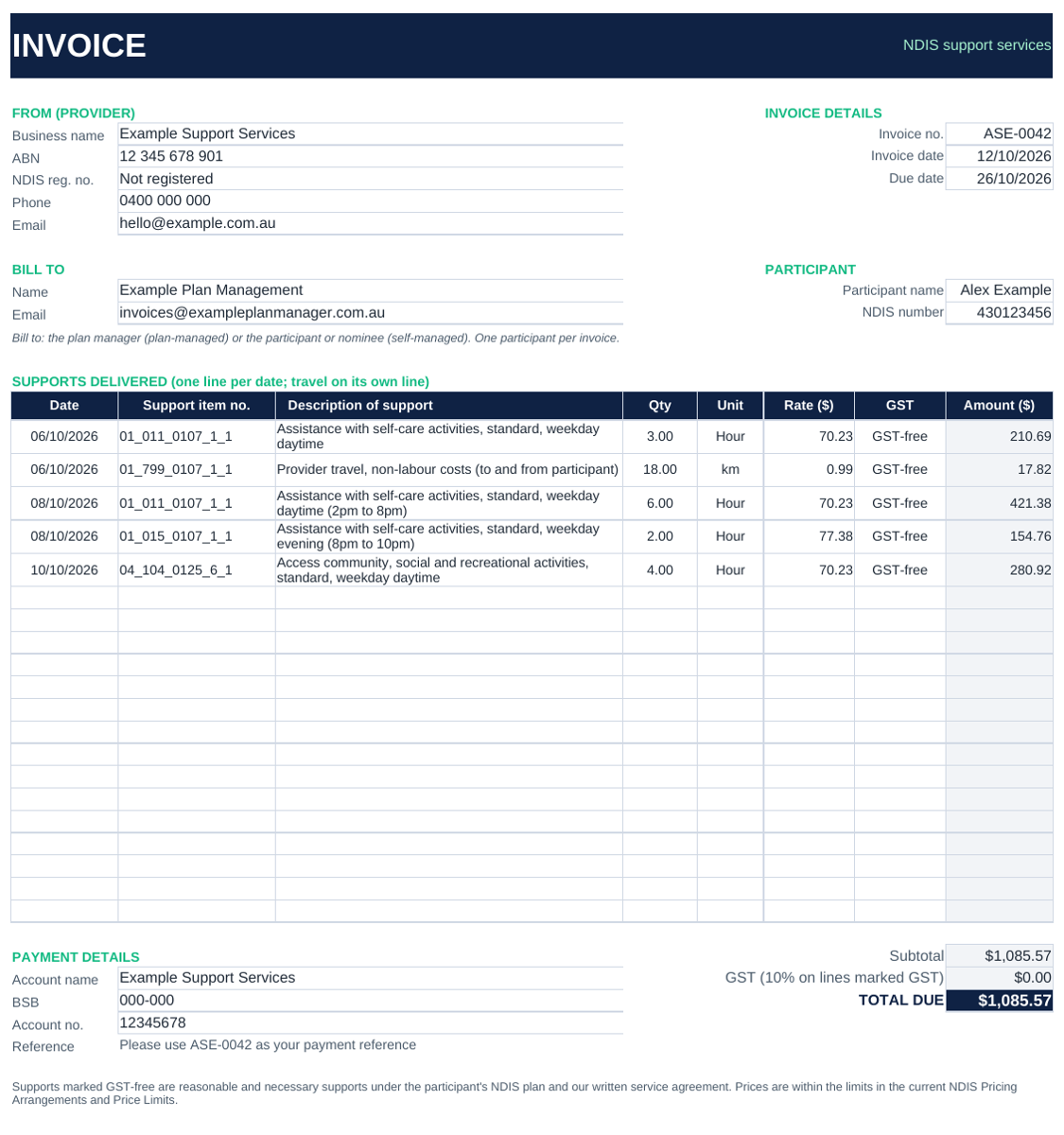
Free NDIS Invoice Template for Support Workers
A free NDIS invoice template with every field plan managers check: your ABN, the participant’s NDIS number, one line per support date, support item numbers, travel on its own line and GST-free status. Download it in Excel or Word, fill it in and save it as a PDF.
Excel template
Adds up every line, the subtotal and the total for you. Includes a filled-in example and a checklist.
Download Excel (.xlsx)Word template
The same layout as a Word document, with placeholders to replace. You add up the totals yourself.
Download Word (.docx)Free to use. No sign-up or email needed. Works in Excel, Word, Google Sheets, Google Docs and Numbers.
What’s included in this NDIS invoice template
- Your business name, ABN, contact details and NDIS registration number (if registered)
- Invoice number, invoice date and due date
- Bill-to details for the plan manager or self-managed participant
- Participant name and 9-digit NDIS number
- One row per support per date, with support item number, description, quantity, unit and rate
- A GST-free or GST setting on every line
- Subtotal, GST and total due (calculated automatically in Excel)
- Bank details and a payment reference
- A step-by-step guide and a “before you send” checklist
How to fill in your NDIS invoice
- Add your details once. Enter your business name, ABN and bank details, then save a copy as your master NDIS invoice template.
- Use a new invoice number every time. Plan managers reject duplicate numbers.
- Add one row per date. Don’t use a date range such as “1 to 14 October”. Each support needs its own date.
- Use the right support item number. Take it from the current NDIS Pricing Arrangements and Price Limits, and stay within the price limit.
- Split shifts that cross rate bands. A weekday shift from 2pm to 10pm, for example, needs a daytime line and an evening line.
- Put travel on its own line, using the provider travel item that matches the support.
- Save as PDF and email it to the plan manager or self-managed participant, one participant per invoice.
For the full rules, including GST, travel and the new 90-day claiming window, read our NDIS invoicing guide for 2026-27.
NDIS invoice template or invoicing software?
An NDIS support worker invoice template is a great place to start. As you take on more participants, the manual work adds up. Here’s how the template compares with doing it in Simplo:
| Free template | Simplo | |
|---|---|---|
| Support item numbers and rates | Look them up and type them in | Built in, pick from a list |
| New prices each July | Check and update yourself | Updated for you |
| One line per date | Type each line | Created from your sessions |
| Evening and weekend shifts | Split them yourself | Add a second code to the session |
| Travel | Add a line and work out the km | Added as its own line |
| Invoice numbers | Keep track yourself | Numbered automatically |
| Paid and unpaid | Track in a spreadsheet | Shown on every invoice, synced with Xero or QuickBooks |
| Session notes and records | Kept somewhere else | Linked to each session |
| Cost | Free | From $14 a month, free 30-day trial |
NDIS invoice template FAQs
Is this NDIS invoice template really free?
Yes. Download the Excel or Word version and use it as often as you like. There’s no sign-up and no email needed.
Can I use this template if I’m not a registered NDIS provider?
Yes. Unregistered providers can invoice plan-managed and self-managed participants. Leave the NDIS registration number blank or write “Not registered”. For agency-managed participants, registered providers claim through the NDIA’s portal instead of sending an invoice.
Do I need to charge GST?
Usually not. Most supports to NDIS participants are GST-free when the conditions are met, including a written service agreement. You only need to register for GST once your turnover reaches $75,000 a year. Mark lines as GST only if you’re registered and the support isn’t GST-free, and check with your accountant.
Can I put a whole fortnight on one invoice?
Yes, for one participant, as long as each date has its own line. Don’t combine more than one participant on an invoice.
This template and page are general information only, not legal, tax or financial advice. Always check the current NDIS Pricing Arrangements and Price Limits and NDIA guidance.
Rather not type codes and rates every fortnight?
Simplo turns your sessions into NDIS invoices in seconds, with the price limits built in, travel on its own line and shifts split across rate bands. Email invoices straight to plan managers.
See how Simplo Solo works30-day free trial · No credit card required · iPhone, Android and web