How to Invoice as an NDIS Support Worker in Australia
This NDIS invoicing guide covers everything you need to know about how to invoice as an NDIS support worker in Australia, including what to include on your invoice, how to send it, and the most common mistakes to avoid.
What is an NDIS Invoice? Understanding NDIS Invoicing Basics
NDIS invoicing starts with understanding what an NDIS invoice is. An NDIS invoice is a document you send to request payment for support services you’ve delivered to a participant. Depending on how the participant’s plan is managed, you’ll send it to either:
- The plan manager – if the participant is plan-managed
- The NDIA directly – if the participant is agency-managed (you claim through the NDIS portal)
- The participant or their nominee – if the participant is self-managed
Knowing which category your client falls into before you start is essential, as it determines where your NDIS invoice goes and how you get paid. Getting this right is the foundation of correct NDIS invoicing.
What Must Be on an NDIS Invoice?
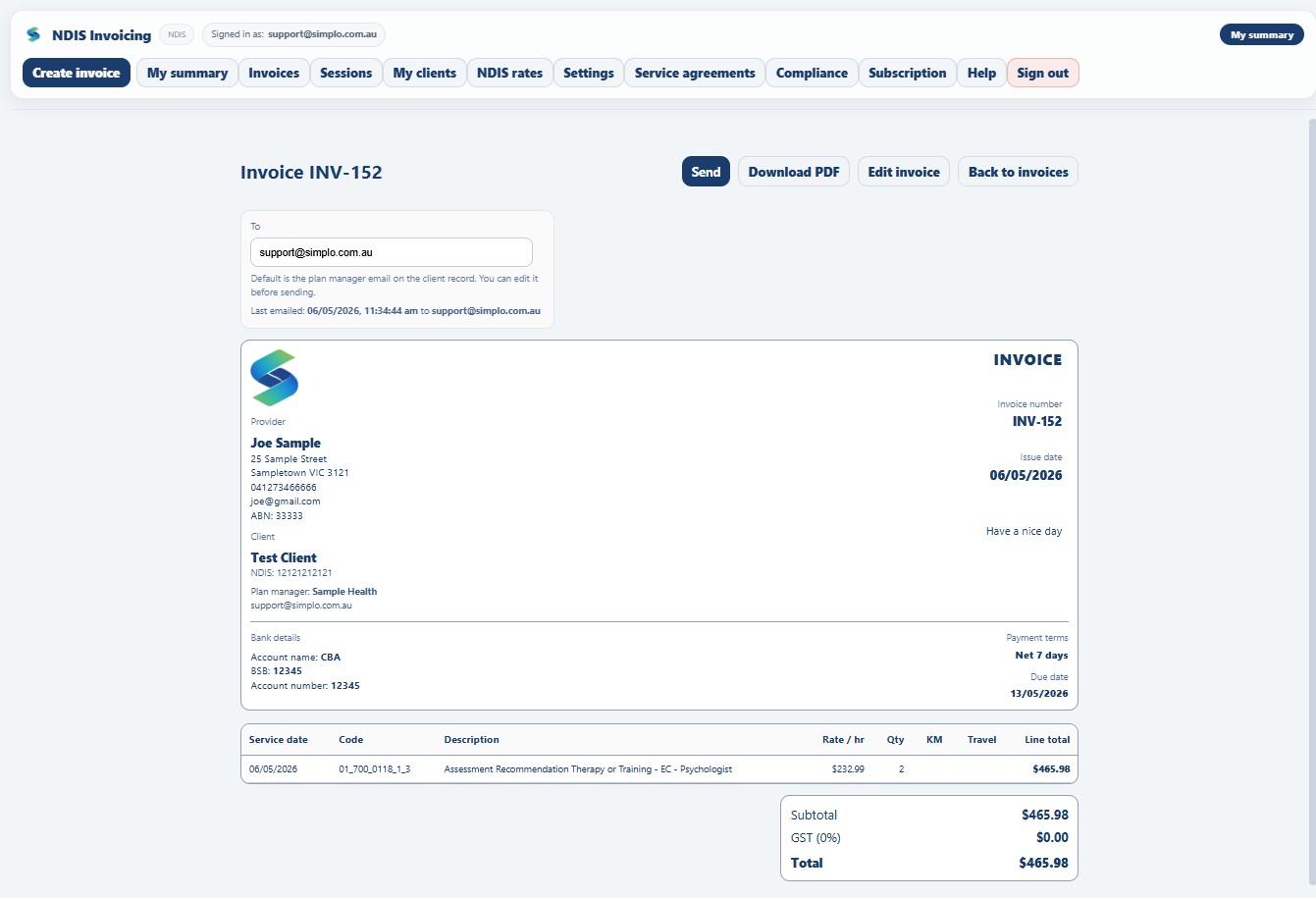
Every NDIS invoice must include the following information to be valid. Correct NDIS invoicing means including all required fields – missing even one can result in a rejected claim:
Your details as the provider:
- Your full name or business name
- Your ABN (Australian Business Number)
- Your contact details (email and/or phone)
- Your NDIS registration number (if you are a registered provider)
The participant’s details:
- The participant’s full name
- Their NDIS number
Invoice details:
- A unique invoice number
- The date the invoice was issued
- The due date for payment
Line items for each service delivered:
- The date the support was delivered
- The NDIS support item number (from the current NDIS Price Guide)
- A description of the support provided
- The unit rate (hourly rate or fixed rate as per the price guide)
- The quantity (number of hours or units)
- The line total
Your payment details:
- Your bank account name
- BSB number
- Account number
Important: If you are registered for GST, you must also include your GST amounts and label the document as a Tax Invoice. Most sole-trader support workers are not registered for GST unless their turnover exceeds $75,000 per year.
How to Find the Right NDIS Support Item Number
One of the most common mistakes NDIS support workers make is using the wrong support item number on their invoice. The NDIS Price Guide is updated regularly and contains hundreds of line items – using an outdated code or the wrong rate can result in your invoice being rejected.
The current NDIS Price Guide is published on the NDIS website. Good NDIS invoicing practice means checking this page regularly as rates are updated. Each line item has a unique code, a description, and a maximum rate. You must not charge more than the maximum rate listed in the price guide for that support item.
Common support categories include:
Make sure you are selecting the correct support category and the correct line item within that category for the service you delivered.
How to Send an NDIS Invoice
Once your NDIS invoicing is complete, how you send it depends on the participant’s plan management type:
Plan-managed participants: Email the invoice directly to the plan manager. Most plan managers have a specific invoicing email address. Payment is typically processed within 5–10 business days.
Self-managed participants: Send the invoice directly to the participant or their nominee. They are responsible for paying you and then claiming reimbursement from the NDIS.
Agency-managed participants: You do not send an invoice. Instead, you submit a payment request through the NDIS myplace provider portal using the participant’s NDIS number and the relevant support item codes.
Common NDIS Invoicing Mistakes to Avoid
- Using the wrong support item code – Always check the current price guide before invoicing. Codes and rates change with each update.
- Missing the participant’s NDIS number – This is required on every invoice and is one of the most common reasons invoices are rejected.
- Charging above the price guide rate – You cannot charge more than the maximum rate listed in the NDIS Price Guide for any support item.
- Not including your ABN – All invoices must include your ABN, even if you are not registered for GST.
- Sending the invoice to the wrong place – Always confirm with your participant whether they are plan-managed, self-managed or agency-managed before sending your first invoice.
- Not keeping records – The NDIS requires you to keep records of supports delivered for at least 5 years. Keep copies of all invoices you send.
How Often Should You Send an NDIS Invoice?
There is no fixed rule on how often you must send an NDIS invoice – you can invoice weekly, fortnightly or monthly. However, invoicing regularly is strongly recommended for cash flow. Most support workers invoice weekly or fortnightly per client.
Keep in mind that plan managers and participants have up to 30 days to process payment in most cases, so the sooner you send your invoice after delivering support, the sooner you get paid.
Do You Need to Be a Registered NDIS Provider to Invoice?
Not necessarily. If your participant is self-managed or plan-managed, you can handle NDIS invoicing as an unregistered provider. You still need an ABN and must comply with the NDIS Price Guide rates, but you do not need to go through the NDIS registration process.
If your participant is agency-managed, you must be a registered NDIS provider to claim payment through the NDIS portal.
Make NDIS Invoicing Easier with Simplo
If you’re creating NDIS invoices manually in Word or Excel, you’re making more work for yourself than necessary – and increasing the risk of errors. Simplo NDIS is the invoicing app built specifically for NDIS support workers in Australia. The NDIS price guide is built in, so you select your support items from a searchable catalogue. Your invoice is generated automatically with the correct codes, rates and all required fields – ready to email directly to the plan manager from the app.
Start your free 30-day trialNo credit card required · Works on any device · Cancel anytime