Free NDIS Invoice Generator
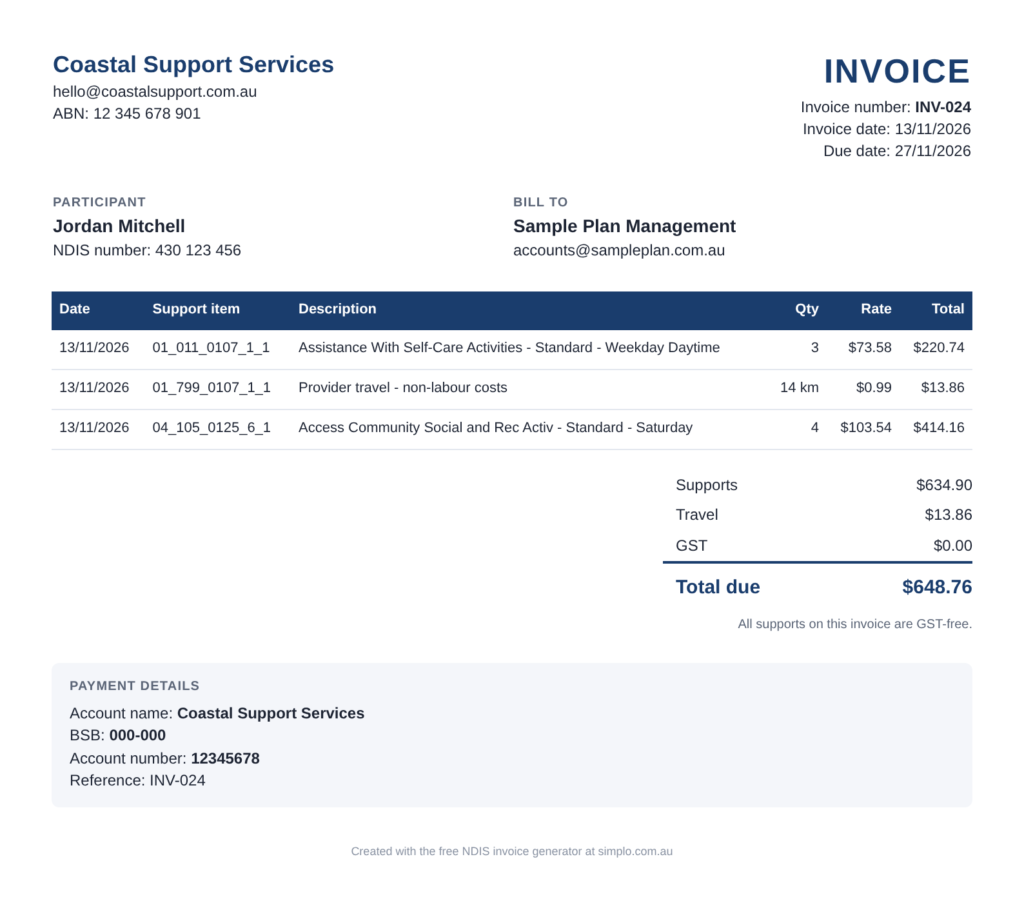
Use this free NDIS invoice generator to create a professional NDIS invoice in a couple of minutes. Pick your support items, and the 2026-27 NDIS price limits fill in for you. Travel goes on its own line, then download a PDF ready to send to the plan manager. Free, no sign-up, and nothing you type leaves your device.
1. Your business
Bank details for payment
2. Participant and plan manager
3. Invoice details
4. Supports delivered
Doing this every week or fortnight?
Simplo is an invoicing and compliance app built for independent NDIS support workers and small providers.
- Clients, plan managers and rates saved, never typed twice
- Invoices made straight from your logged sessions
- Price limits kept up to date, travel on its own line
- Emails invoices to plan managers and syncs to Xero or QuickBooks
- Session notes, case notes and audit-ready compliance records
30 days free. No card required.
Start free on the web App Store Google PlayHow to use this NDIS invoice generator
This NDIS invoice generator follows the same order a plan manager reads an invoice, so nothing gets missed.
1. Add your business details. Enter your trading name, ABN and bank details once. Tick “Remember my business details” and they will be filled in next time.
2. Add the participant. Enter their name, NDIS number and plan manager. If the participant self manages, type “Self managed” instead.
3. Choose each support item. Search by name or code, for example “self-care saturday” or “01_011”. The current NDIS price limit fills in, and you can lower it to match your service agreement.
4. Add travel on its own line. Choose “Driving to or between clients” for provider travel or “Driving with the client” for activity based transport, then enter the kilometres and your per-km rate.
5. Download the PDF. Check the totals and download your invoice, ready to email to the plan manager.
Is this NDIS invoice generator really free?
Yes. There is no sign-up and no limit on how many invoices you make. It is made by Simplo, an Australian app for independent support workers. If you invoice regularly, the Simplo app saves your participants, sessions and invoice history so you never start from a blank form.
What should an NDIS invoice include?
Plan managers and the NDIA look for the same core details on every invoice: your business name and ABN, the participant’s name and NDIS number, an invoice number and date, and for each support the date delivered, the support item number, a description, the hours or quantity, the price and the line total. It should also show the total and whether GST applies. Most NDIS supports are GST-free.
Why do invoices get rejected?
The most common reasons are a wrong or outdated support item number, a price above the current price limit, a missing NDIS number, or travel mixed into the support line instead of claimed separately. This generator uses the current support catalogue and puts travel on its own line to help avoid those problems.
Can I charge less than the price limit?
Yes. The price limit is the maximum you can claim. You can change the rate on any line to match your service agreement.
Is my information saved?
No. Everything stays in your browser. If you tick “Remember my business details”, only your business and bank details are kept on this device to save you typing them next time. Participant details are never stored.
Price limits shown are from the NDIS Support Catalogue 2026-27 and are provided as a guide. Always check them against your service agreement and the current NDIS Pricing Arrangements. Simplo is an independent product and is not affiliated with, endorsed by or connected to the NDIA, the NDIS Commission or the Australian Government.