
Simplo NDIS Teams · $49/month
NDIS team management software for Australian providers
Simplo Teams is NDIS team management software that lets you invite workers, assign sessions, track every shift from clock-in to invoice and manage your whole team from one place. One flat monthly price. Unlimited workers.
$49/month after trial · Unlimited workers · Workers join free · Cancel anytime
- Built in Melbourne, Australia
- Workers join free
- Data stored in Australia
- 30-day free trial, no card needed
- Personal replies, usually within hours
See it in action
Watch how Simplo Teams works
See how to invite workers, assign sessions, track every shift from clock-in to invoice and manage your whole team from one screen.
How it works
One app. Two experiences. Everything connected.
Simplo Teams gives you a full owner dashboard to manage your team, and a simple worker app your support staff use for their shifts. Everything stays in sync in real time.
For you as the owner
- Invite workers and manage your whole team from one screen
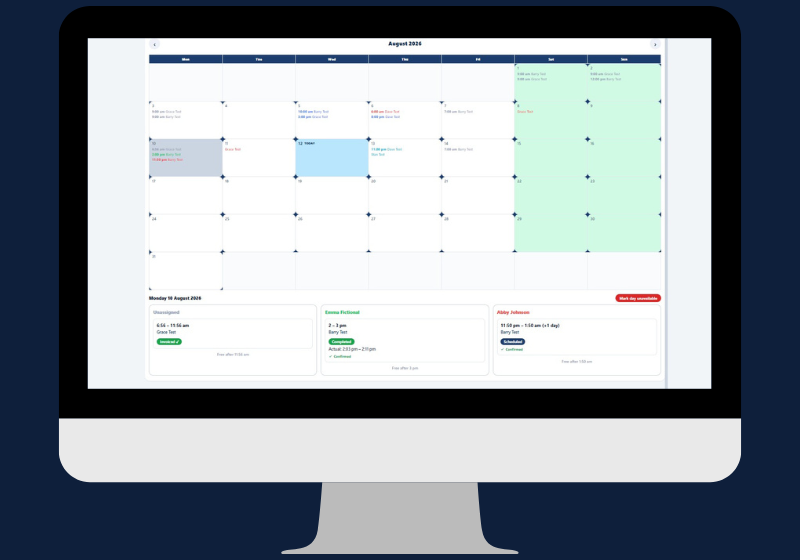
- Session calendar with month, week and day views, colour-coded by worker
- Assign sessions with per-session instructions for each worker
- Clash detection prevents double-booking before you save
- Instant notification when a worker accepts, declines, clocks in or clocks out
- Instant notification if a worker logs an incident
- See worker unavailability before you book them
- Review and edit session notes before invoicing
- Pay rate cards per worker across 7 pay bands
- Pay summary reports with automatic time-band splitting
- Invoice directly from sessions, pulling all uninvoiced sessions at once
- Xero and QuickBooks Online integration included
- Full owner experience on iPhone and any web browser
For your support workers
- Instant iPhone push notification when a shift is assigned
- Accept or decline shifts from their phone
- Full client details visible before the shift starts
- Emergency contacts, medical conditions and medications unlock at clock-in only
- Your per-session instructions shown clearly on every shift screen
- Clock in and clock out with real timestamps
- Log kilometres to the client and kilometres driven with the participant
- Flag anything for your attention with an optional note
- Log an incident before submitting the session
- Add out-of-pocket expenses with a description
- Dictate or type a session note before submitting
- View their own summary of sessions, hours and kilometres
- Flag unavailable dates with an optional reason
- iPhone app and web access at teams.simplo.com.au
The owner dashboard
Five tools that run your team from one screen
This NDIS team management software gives you everything you need to manage workers, review sessions, set pay rates and track what your team has delivered – all on the web or your iPhone.
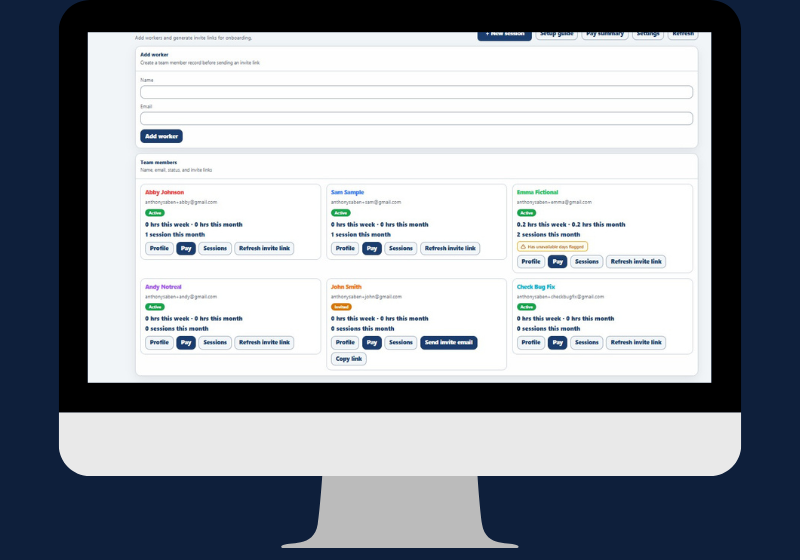
Manage all workers from one screen
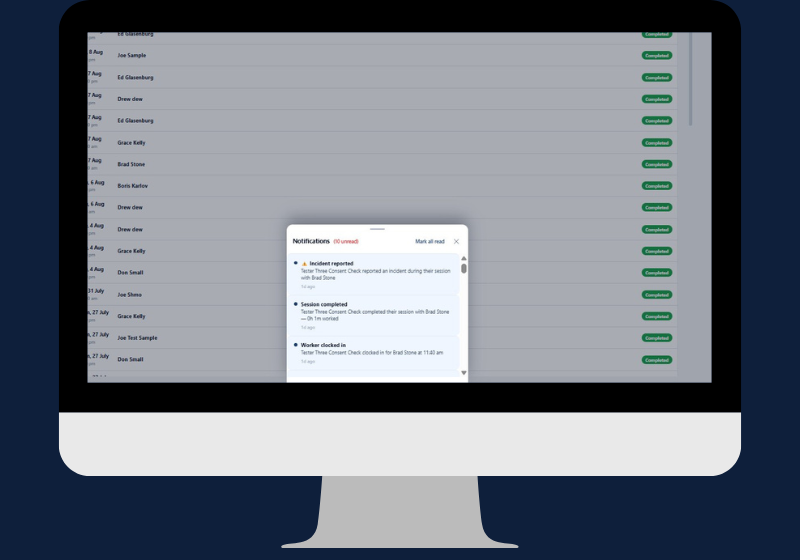
In-app notifications for incidents, completions and clock-ins
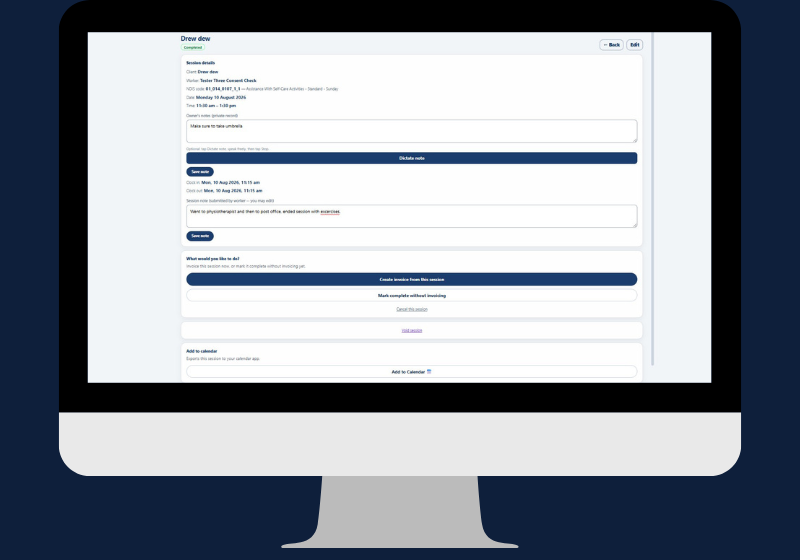
Review the session note and create an invoice in one screen
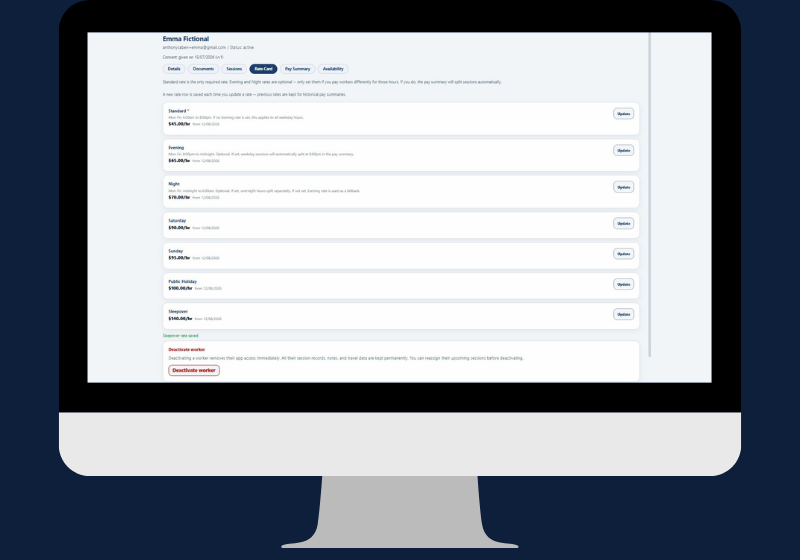
Pay rate card: 7 bands per worker, updated at any time
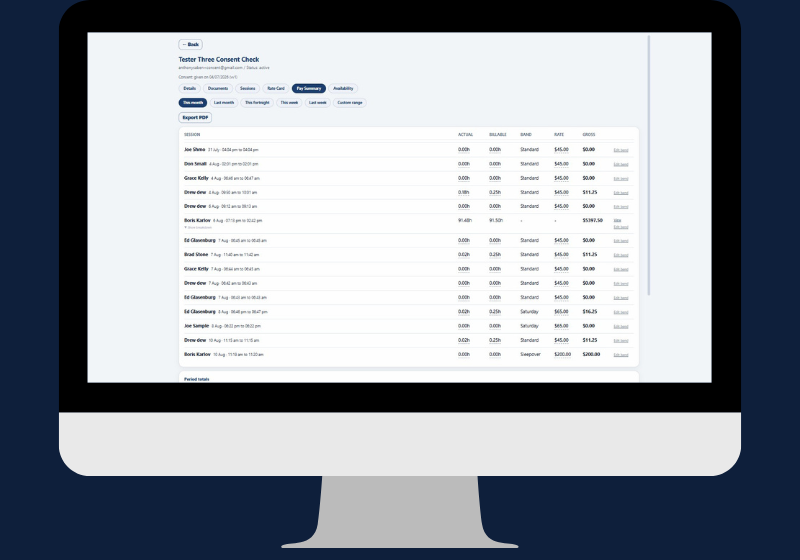
Pay summary: actual hours, rate band and gross per session
The worker experience
What your workers see from first notification to final summary
Every worker gets a clean, simple app built around their shift. Here is the complete journey from the moment a shift is assigned to the end-of-week summary.
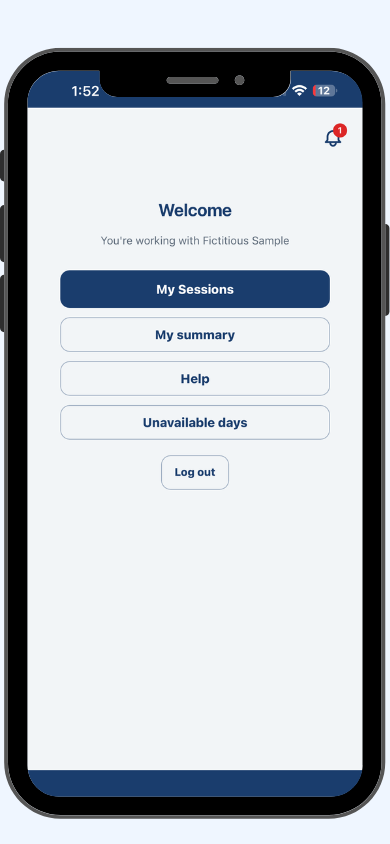
Worker app dashboard
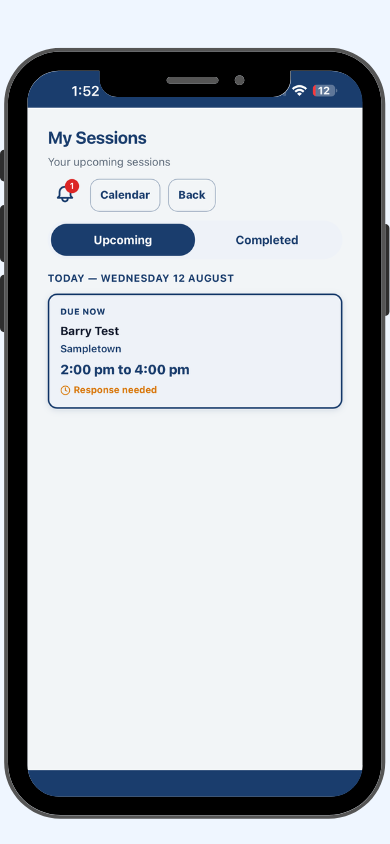
Upcoming sessions at a glance
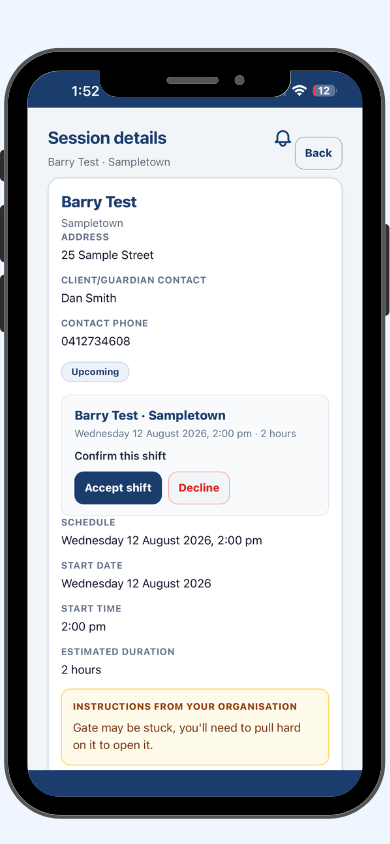
Accept or decline in one tap
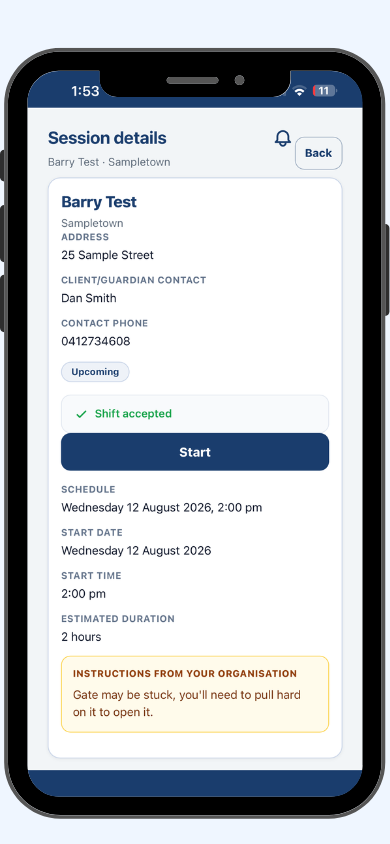
Full shift details after accepting
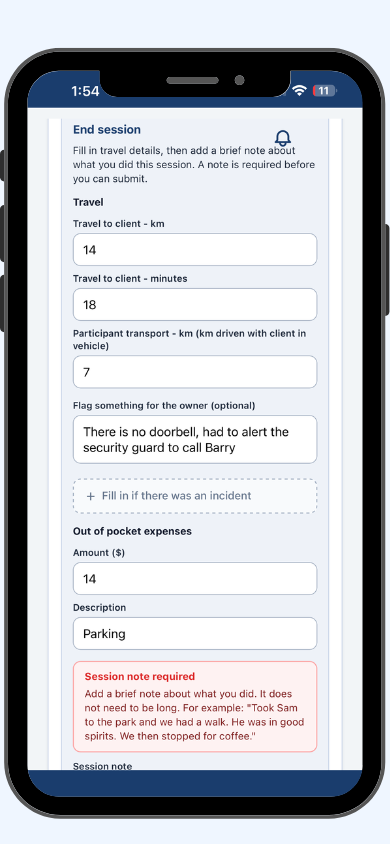
Travel, expenses and notes at clock-out
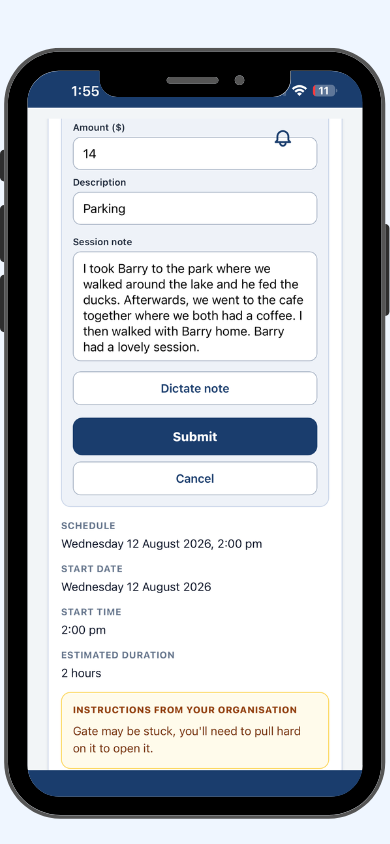
Session note with dictate option
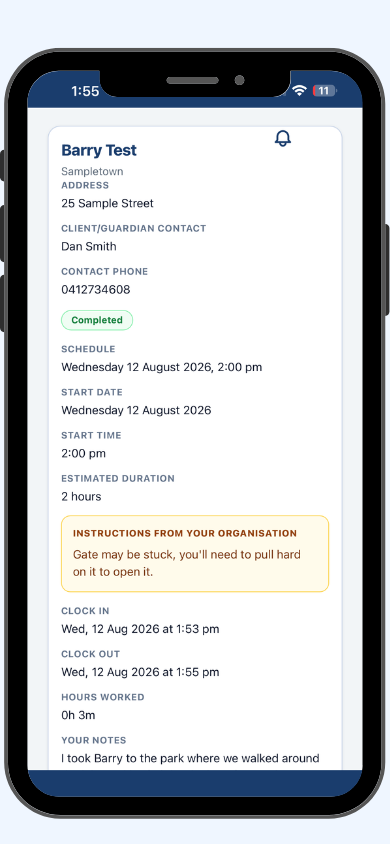
Completed session with real clock times
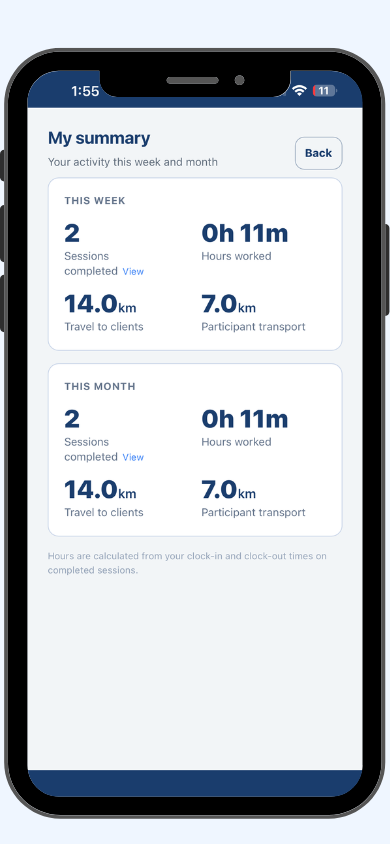
Weekly and monthly activity summary
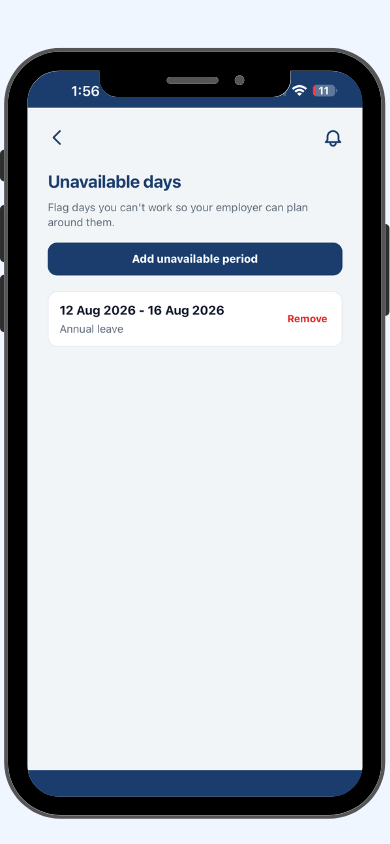
Flag unavailable days for the owner
Features in detail
NDIS team management software built around the way support work actually happens
Every feature is designed around a real moment in the NDIS support delivery cycle – from booking to clock-out to invoice.
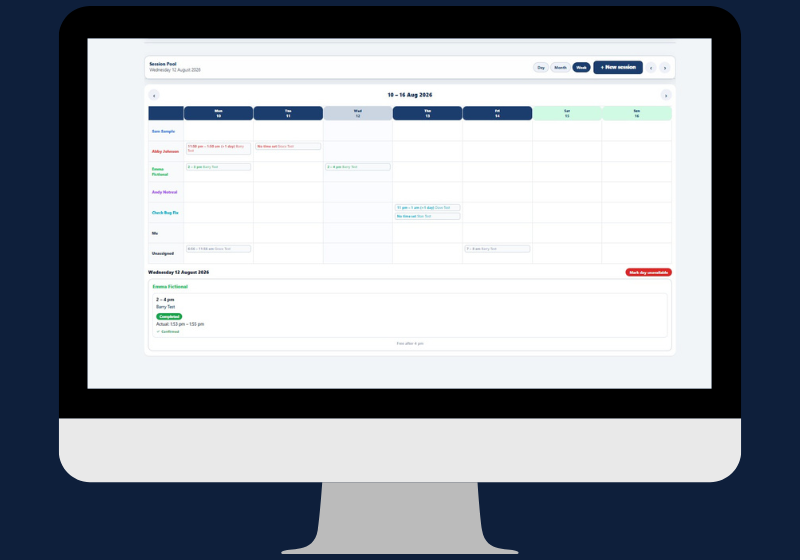
Session scheduling
Every worker. Every session. One calendar. No clashes.
Schedule sessions in a monthly, weekly or day calendar view. Each worker’s sessions are colour-coded so you can see your whole team’s availability at a glance. Clash detection checks for conflicts before you save – you cannot accidentally double-book a worker.
- Month, week and day calendar views
- Colour-coded sessions by worker name
- Clash detection before every save
- Per-session instructions for each worker
The worker experience
Workers know exactly what to do before they arrive.
When a worker opens their assigned session, they see the client address, your instructions for the shift, and the client’s full care details. Emergency contacts, medical conditions, allergies and medications are locked until clock-in – then hidden again at clock-out. Workers see only what they need, when they need it.
- Client details and your instructions visible before the shift
- Emergency and medical details unlock at clock-in only
- Push notification the moment a shift is assigned
- Accept or decline from their phone
End-of-shift flow
Clock out. Log travel. Flag incidents. Done in 60 seconds.
At the end of every shift, workers clock out with a real timestamp, log kilometres driven to the client and with the participant, and dictate or type a session note. If an incident occurred, they flag it before submitting. You are notified instantly. The whole process takes under a minute and creates a complete, contemporaneous record.
- Real clock-out timestamp, not an estimated time
- Kilometres to client and with participant logged separately
- Session notes by voice dictation or typing
- Incident flagged at point of care, not reconstructed later
Pay summaries
Pay your workers correctly. Every shift, every rate band.
Set pay rate cards per worker across 7 pay bands covering weekday, evening, Saturday, Sunday, public holiday and more. The pay summary report calculates hours per band automatically based on real clock-in and clock-out times. No manual time-band splitting, no spreadsheet to maintain.
- Rate cards per worker across 7 pay bands
- Automatic time-band splitting from real clock times
- Pay summary report per worker for any period
- Hours calculated from actual timestamps, not estimates
Real-time notifications
You know the moment anything happens. So do your workers.
This NDIS team management software is built around immediate communication between you and your workers. No chasing. No guessing. No end-of-day surprises.
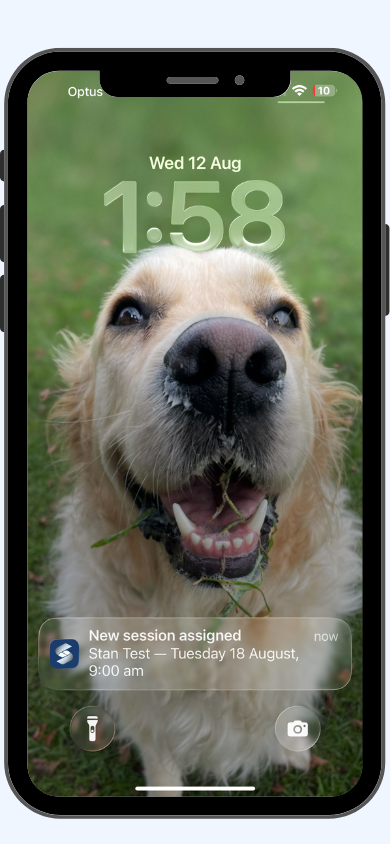
Shift assigned
Worker receives an instant iPhone push notification the moment you save the session. Also visible inside their app under My Sessions.
Accepted or declined
You are notified the moment your worker responds. If a shift sits unaccepted you have time to reassign before the session date.
Clock-in and clock-out
You are notified when the shift starts and when it ends. Hours are calculated from real timestamps, not estimates entered at booking.
Incidents
If a worker flags an incident at the end of a shift, you are notified immediately and can open the details straight from the notification.
Worker unavailability
When a worker flags unavailable dates, an amber badge appears on their card. A warning shows if you try to book them on a flagged day.
In-app notification centre
Every notification is also stored inside the app so you can review the full history of events for any session or worker at any time.
NDIS compliance
The NDIS expects evidence. Simplo Teams builds it automatically.
This NDIS team management software generates that evidence automatically at every step – from real clock times to timestamped session notes to incident logs recorded at the point of care.
Timestamped session notes on every invoice
Your worker writes a session note at the end of every shift. You review and edit it, then choose whether to include it on the invoice. When it appears on the printed invoice it is timestamped and tied to that service line. That is the kind of real-time evidence auditors look for.
Real clock-in and clock-out times
Hours on every pay summary and invoice are calculated from actual clock times recorded in the app, not from estimated hours entered at booking. That distinction matters when a plan manager or auditor asks you to substantiate a claim.
Incidents logged at the point of care
Workers log incidents at the end of the shift before they leave. The record is created at the time it happened, by the person who was there. Not reconstructed later from memory. You are notified immediately and the incident feeds directly into your registers.
Everything included
Teams includes all of Solo and Pro. Nothing left out.
This NDIS team management software is not just a scheduling tool. The $49 monthly price includes the full invoicing, compliance and reporting suite.
Full NDIS invoicing
- NDIS price guide built in and kept current
- Client management with NDIS number validation
- Session calendar with month, week and day views
- Recurring session scheduling
- Invoice from any session, all uninvoiced sessions load automatically
- Service agreements with editable clauses
- Email invoices directly to plan managers
- Xero and QuickBooks: invoice paid there, marked paid here
- PDF reports: revenue, client spend, paid and unpaid
Full NDIS compliance
- SOAP-format case notes via voice dictation
- Incident, complaint and continuous improvement registers
- Compliance documents tracker with expiry alerts
- Qualifications tracker with certificate attachments
- Policy library with 21 NDIS policies included
- Audit readiness dashboard
- Full audit package export as a ZIP file
Team management
- Invite and manage unlimited workers
- Colour-coded calendar with clash detection
- Per-session instructions for each worker
- Worker iPhone app and web access
- Real-time push notifications for every shift event
- Clock-in and clock-out with real timestamps
- Kilometre tracking: to client and with participant
- Worker unavailability with owner notification
- Pay rate cards across 7 pay bands
- Pay summary reports with automatic time-band splitting
- Evidence-based invoicing with timestamped session notes
From first invite to final invoice
Four steps. Everything connected.
This NDIS team management software is built around the way team-based support work actually happens. Each step connects directly to the next.
Invite your workers
Enter a name and email. The app sends the invitation automatically. Workers create a free account, download the app or open it in their browser, and they are ready within minutes.
Schedule and assign sessions
Create sessions in your calendar and assign them to workers. The app checks for clashes before you save and sends the worker an instant push notification the moment the shift is created.
Workers manage their shifts
Workers accept or decline from their phone, clock in on arrival, and at the end of each shift log travel, any incidents and a session note. You are notified at every step in real time.
Invoice and sync to accounts
Create an invoice from a session and all other uninvoiced sessions for that client load automatically. Push to Xero or QuickBooks Online in one tap. If it is paid there, Simplo marks it paid automatically.
Pricing
One flat price. Unlimited workers. No surprises.
This NDIS team management software is $49 per month. That covers your entire team. There is no per-worker charge and no limit on how many workers you can add.
Teams
For NDIS providers who manage a team of support workers. Unlimited workers, one flat monthly price, everything in Solo and Pro included.
One flat price · Unlimited workers · Cancel anytime
- Everything in Solo and Pro, plus:
- Invite and manage unlimited workers
- Session calendar with colour-coding and clash detection
- Worker iPhone app and web access at teams.simplo.com.au
- Instant push notifications for every shift event
- Clock-in and clock-out with real timestamps
- Kilometre tracking: to client and with participant
- Worker unavailability with owner notification
- Pay rate cards per worker across 7 pay bands
- Pay summary reports with automatic time-band splitting
- Evidence-based invoicing with timestamped session notes
Not ready for Teams yet?
If you work independently without a team, Simplo also offers Solo and Pro. You can upgrade to Teams at any time and everything carries over.
NDIS invoicing, session calendar, service agreements, Xero and QuickBooks Online, PDF reports. For independent support workers.
Learn about Solo →Everything in Solo plus SOAP case notes, incident registers, compliance document storage, policy library and audit export. For sole traders who need full compliance records.
Learn about Pro →Integrations
Works with Xero and QuickBooks Online
Push invoices. Invoice paid in Xero or QuickBooks? Simplo marks it paid automatically.
Send invoices to Xero or QuickBooks Online in one tap. When the invoice is marked as paid in either accounting system, Simplo automatically updates the status. No manual updates, no opening two apps to check what has come in.
Included on Simplo Teams at no extra cost. Set up in minutes.
Same login. All your data.
Upgrade from Solo or Pro and nothing is lost
Simplo Teams is a separate app with its own listing on the App Store, but it uses the same account you already have. When you upgrade, every client, invoice, session and compliance record is exactly where you left it. No re-entering data, no starting over.
Your data stays in Australia, stored in accordance with the Australian Privacy Principles. If you ever decide to leave, you export everything – clients, invoices, sessions, pay summaries and compliance records – and walk away with it all. No lock-in, no exit fee.
Same login
Your existing Simplo account works in the Teams app. Upgrade and you are in, instantly, with all your existing data.
Export anytime
Download clients, invoices, sessions, pay summaries and compliance records at any time. Your data is yours from day one.
Cancel anytime
No lock-in contracts. Cancel from your account settings and your subscription ends at the close of your billing period. No penalty, no exit fee.
Why Simplo Teams
NDIS team management software built specifically for Australian providers
One flat $49 monthly price covers your entire team. Add your first worker or your fiftieth. The price does not change. No per-worker fees, no per-client fees, no hidden charges.
Workers join for free. They download the app or use the browser. There is nothing for them to pay and no limit on how many you can invite.
The NDIS price guide is built in and kept current. You select from a searchable catalogue when creating invoices. No manual code lookups, no spreadsheet to maintain.
Real clock-in and clock-out timestamps mean your pay summaries and invoices are based on actual hours worked, not estimates. That distinction matters when a plan manager or auditor asks you to substantiate a claim.
Your client and participant data is stored in Australia in accordance with the Australian Privacy Principles. Built and supported from Melbourne.
Questions get a personal reply, usually within hours. You are talking directly to the team who built Simplo – not a support queue, not a chatbot, not a call centre.
FAQ
Questions about Simplo Teams
No. Workers join for free. This NDIS team management software charges one flat $49 per month that covers your entire team, no matter how many workers you invite. Workers download the Simplo NDIS Teams app from the App Store or access it at teams.simplo.com.au. There is no cost to them and no limit on how many you can invite.
No. Simplo Teams is suitable for both registered and unregistered NDIS providers. Registration is not required to manage a team of support workers. If you are unregistered, you can deliver supports to plan-managed and self-managed participants. Registered providers can also work with agency-managed participants. If you are working toward registration, the compliance features included in Teams – drawn from Simplo Pro – are designed to support that process.
Workers see the sessions assigned to them, the client details they need to deliver the support and their own shift history. Client emergency contacts, medical conditions, allergies and medications are locked until the worker clocks in, then hidden again after clock-out. Sensitive business information such as NDIS numbers, funding details, plan manager contacts and invoice data is never visible to workers. Workers can only see their own sessions, never those assigned to other workers.
Nothing is lost. Simplo Teams uses the same account credentials as Solo and Pro. All your clients, sessions, invoices and compliance records carry over automatically. The Teams app is a separate download from the App Store, but your login is identical. You are up and running from the moment you upgrade.
No. The $49 per month flat price covers unlimited workers. Add your first worker or your fiftieth. The price does not change.
An iOS app is available now on the App Store. Android is on the way. In the meantime, workers can access the full Teams experience through any web browser at teams.simplo.com.au on their Android phone, so no worker is without access while Android is in development.
Get started
Ready to manage your team in one place?
This NDIS team management software is free for 30 days. No credit card required. Workers join free. $49 per month after your trial ends.
Start your free trialAndroid coming soon · Workers can access via teams.simplo.com.au now